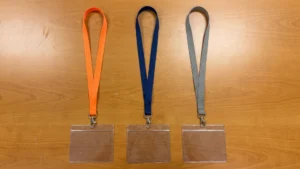
Why conference name badges flip and hide
Attendees constantly walking, sitting, and interacting at an event create movement that can easily cause identification credentials to twist and flip backwards. The physical setup of the strap, the attachment hardware, and the badge holder dictates how the credential responds to these rotational forces. A single connection point on a lanyard strap acts as a pivot, which allows the badge to spin freely whenever the wearer brushes against a table or moves abruptly. You can prevent this frustrating networking barrier by evaluating how each component of the lanyard and holder works together to maintain a stable forward-facing position.
Choosing the right lanyard length for visibility
The drop length of a lanyard strap determines exactly where the name badge rests on the body. Standard lanyard lengths typically position the credential around the mid-chest, which keeps the printed information clearly visible during face-to-face conversations. If the strap is too long, the badge holder will hang near the stomach and become obscured by tables, clothing folds, or crossed arms when attendees sit down for presentations. Evaluating standard dimensions helps procurement teams ensure the credential sits at an optimal height for both standing and seated interactions.
You should also consider how the length interacts with the physical build of your attendees and the type of clothing they typically wear. A mid-chest placement offers the best balance of visibility and user comfort for most people. Staff and venue managers can test a sample lanyard with the intended badge holder to see where the combination naturally falls. Making an informed dimension choice prevents attendees from constantly adjusting their credentials and allows them to focus entirely on the event activities.
Attachment styles that stop name badges from spinning
The connection point between the lanyard strap and the badge holder heavily influences whether the credential remains upright or twists around. Distinguishing the lanyard strap from the attachment hardware helps you understand why some setups lock the orientation in place while others fail to resist movement. Selecting the right clip style delivers immediate mechanical stability without requiring complex adjustments from the wearer.
Single attachments and rotation risks
A single swivel hook provides a 360-degree rotating joint that connects the lanyard to the center of the badge holder. This single connection acts as a central pivot point, which removes any directional resistance and allows the badge to balance on one coordinate. Whenever the wearer walks, creates an air draft, or brushes against clothing, the external rotational forces spin the badge freely.
The location of this single connection point also influences the Center of Gravity (CG) of the identification holder. If the slot punch on the badge holder is slightly off-center or the insert shifts, the center of gravity moves away from the pivot point. Gravity then pulls the heaviest part of the holder downward, which causes the badge to hang crookedly or flip completely over.
Double clip systems for maximum stability
A double clip system connects the lanyard to both the left and right corners of the badge holder instead of relying on a single center point. This dual connection creates a wide, fixed horizontal axis that traps the center of gravity directly below the attachment points. Because the weight distributes equally across two separate anchors, the credential cannot pivot, spin, or swing.
Using a two-point attachment offers maximum stability and forces the credential to lay completely flat against the chest. This wide stance matches the natural contour of the wearer and entirely prevents the backward flipping caused by momentum. Event organizers often choose double-ended lanyards to ensure that attendee names remain visible at all times.
Selecting clear sleeves and badge holders
Choosing the physical holder requires examining how material stiffness, weight, and surface finish affect readability on the event floor. The badge holder interacts directly with both the paper insert and the venue lighting to determine how easily people can read the printed names. Guiding your team through these physical characteristics helps avoid common mistakes that obscure identification and frustrate attendees.
Matching holder size to insert weight
The gauge, or thickness, of a plastic badge holder interacts directly with the weight of the paper insert to determine the overall rigidity of the credential. Standard printer paper placed inside a thin Polyvinyl Chloride (PVC) holder lacks structural integrity, which causes the entire badge to bend, crease, and flip over easily. If you use a lightweight paper insert, you must pair it with a thicker, rigid badge holder that can act as a protective shield and keep the paper flat.
Alternatively, you can use a heavy cardstock insert to provide the structural stiffness that a thin vinyl holder lacks. This combination allows the heavy paper to act as a skeleton that keeps the badge upright while reducing the cost of the plastic holder. You must ensure the holder is wide enough to accommodate the thickness of the cardstock, as a tight fit can warp the plastic or make assembly difficult.
Reducing glare with suitable plastic finishes
Standard glossy badge sleeves feature a perfectly smooth surface that acts like a mirror and creates high glare under direct light. When overhead fluorescent conference lights strike these glossy surfaces, the specular reflection can completely blind the viewer and obscure the printed name. Thicker plastic sleeves can even magnify this effect by creating double reflections from both the front and back surfaces of the material.
To improve visibility in harsh lighting environments, you can select premium sleeves with matte or embossed finishes. These anti-glare surfaces scatter light waves in different directions, which drastically reduces severe reflections. If your inserts contain barcodes or QR codes for electronic scanning, a non-glare finish prevents the plastic from disrupting the scanners and slowing down venue access.
Double sided printing as a reliable backup
Printing the attendee name and role on both sides of the insert card provides a simple and highly effective operational failsafe. Even with careful hardware planning, sudden movements or heavy clothing can still cause a perfectly balanced lanyard to shift or twist out of place. A double-sided insert guarantees that the critical identification information remains visible regardless of how the physical holder rests against the wearer.
This cost-effective strategy complements your hardware choices without requiring expensive modifications to the lanyard strap or the attachment clip. Your organizing team only needs to format the initial design template to duplicate the front layout onto the back of the card before printing. Adding this simple backup measure ensures a professional appearance and removes any remaining barriers to smooth networking on the event floor.
Steps for assembling and distributing visible conference badges
Careful planning of materials only succeeds when the final products are correctly assembled and handed out on the actual event floor. Organizing the assembly and distribution process improves efficiency for your staff and maintains a professional appearance as attendees arrive. Your team can follow a clear chronological sequence to ensure every credential works exactly as intended.
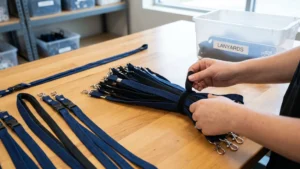
- Step one: Assemble the materials Before the event begins, staff should slide the printed inserts into the clear badge holders while checking that the paper sits entirely flat. Connecting the lanyard clips to the holders in a controlled back office environment prevents bottlenecks at the registration desk. This preparation step confirms that all components fit together smoothly before guests arrive.
- Step two: Organize the credentials Arrange the completed badges alphabetically on staging tables or specialized racks to allow for rapid retrieval. Keeping the lanyards untangled and the names facing upward reduces wait times when large groups of attendees arrive simultaneously. Staff can quickly scan the organized rows and hand out the correct badge without fumbling through loose parts.
- Step three: Distribute to attendees When attendees approach the registration area, staff should hand over the fully assembled badge directly to the user. Providing a completed credential ensures the double clip systems are attached correctly and the printed side faces outward. This direct handover establishes a welcoming tone and eliminates confusion about how the hardware works.
- Step four: Provide wearing instructions Staff should politely remind attendees to adjust the lanyard strap so the badge rests comfortably at mid-chest height. Offering a quick visual check helps the wearer position the credential correctly for maximum visibility during the conference. A clear instruction at the registration desk ensures the carefully planned materials perform perfectly on the event floor.
How long should a conference lanyard be to keep name badges readable?
Aim for mid-chest so the badge sits flat and clears clothing layers. Adjust the length so the top of the holder sits above necklines and does not hit tables when seated. Ask staff to check fit at pickup. If heights vary, offer adjusters or two lengths.
Which attachment stops badges from flipping or spinning?
A double-ended lanyard with two clips at the top corners keeps the badge flat by creating a fixed horizontal axis. A swivel hook is a rotating clip that lets the badge spin. If you must use one clip, pick a non-swivel and a centered-slot holder. Keep double-sided printing as backup.
Does a vertical or horizontal holder stay forward more reliably?
Orientation alone does not decide stability. What matters is the pivot over the center of gravity, the balance point of the holder. Horizontal holders often include two holes that suit double-ended lanyards. Vertical holders can stay forward when you use two clips or a single, truly centered slot.
How can we cut glare on clear sleeves under bright lighting?
Pick matte or anti-glare sleeves and avoid glossy paper inserts. Polyvinyl chloride, written as PVC, is common but reflective, while polyethylene terephthalate, written as PET, or polypropylene can reduce harsh reflections. Thicker sleeves can create double reflections that hinder scanning. Test under venue lighting and adjust viewing angles during check-in.
Is double-sided printing worth it if badges still flip?
Yes, double-sided printing reduces missed reads when a badge turns, but treat it as a safety net. Prevent flipping first with a double-ended lanyard or a non-swivel clip on a centered slot. Use clear type, strong contrast, and an anti-glare sleeve. Combine tactics for crowded rooms.